GWorkspace application in GNUstep, is like the equivalent to Nautilus under GNOME. It has interesting features that I'm beginning to love, right now I believe GNUstep is for UNIX-geek-old-fashioned.
Here is the screenshot for changing the background image, you need to go to Info->Preferences->Desktop (drop down) then click Choose button for search the image.
I'm running GNUstep compiled in Ubuntu 10.04 and the image comes from the folder /usr/share/backgrounds/

Another really cute functionality of GWorkspace is start applications from their installation folder, you need to open the viewer from menu View->Viewer and go to the installation application folder (in my case compiled from sources: /usr/local/lib/GNUstep/Applications) then a double-click starts the application (*.app)
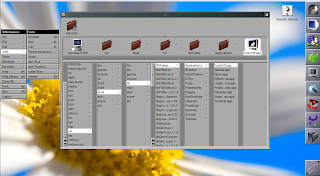
Here is the screenshot for changing the background image, you need to go to Info->Preferences->Desktop (drop down) then click Choose button for search the image.
I'm running GNUstep compiled in Ubuntu 10.04 and the image comes from the folder /usr/share/backgrounds/


Comentarios